Orbix – Nuxt Admin & Dashboard Template (Tailwind CSS)
Thank you for choosing Orbix. This manual covers version 1.0.3 of the Nuxt edition built on
Tailwind CSS v4. It opens offline from documentation/index.html and the same pages are published online.
What Orbix is
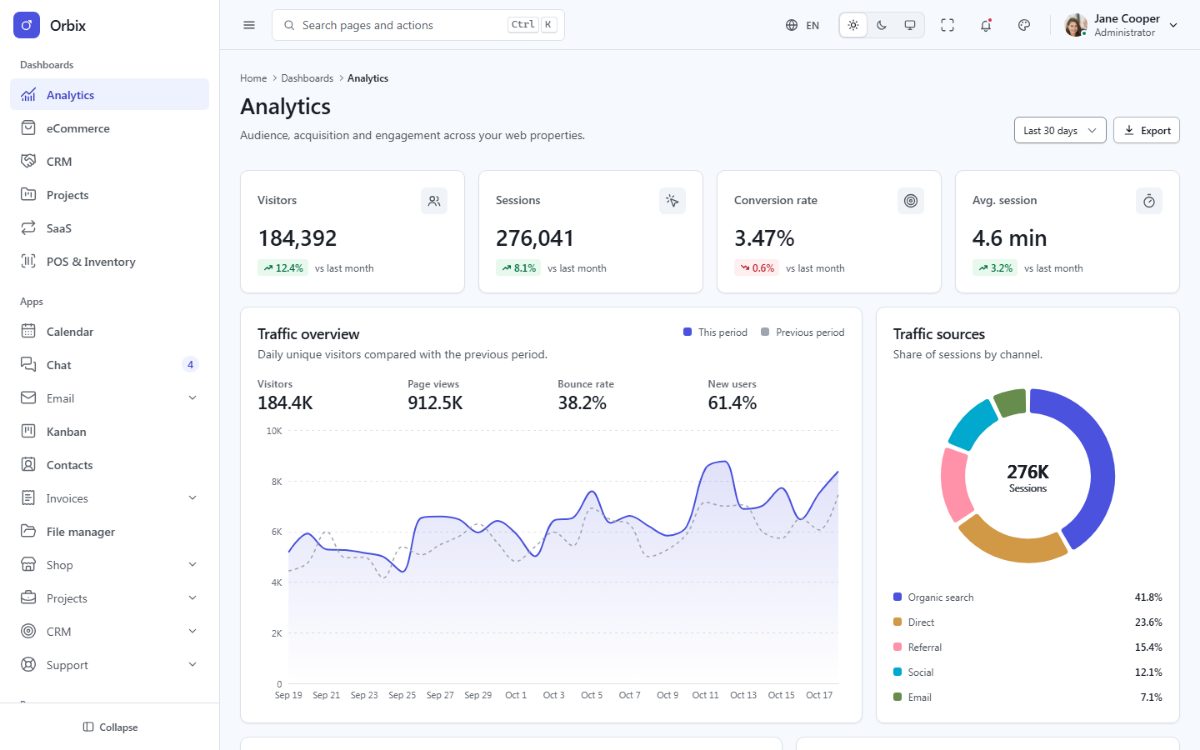
Orbix is a complete admin and dashboard template for Nuxt 4 + Vue 3.5 + TypeScript. Every screen is a
file-based Nuxt page (src/pages) with translated texts and reusable components, rendered on the server and
hydrated in the browser. By default nuxi generate prerenders every page to static HTML, so the site runs on any
static host; the same code also runs as a Node.js server. In the browser the language, the theme and the layout
change without a reload. Start building your back office, SaaS panel or internal tool on day one. No back end is
needed to browse the template: the demo data is static.
Highlights
- 129 pages: 6 dashboards (Analytics, eCommerce, CRM, Projects, SaaS subscriptions, Point of sale), 24 app screens (calendar, chat, email, kanban, contacts, invoices, file manager, shop, projects, CRM, support desk), 27 authentication pages in three styles, account, utility and status pages, UI components, forms, tables, charts and icon galleries.
- Nuxt 4 with file-based pages,
definePageMeta, three layouts (app,auth,blank) and an error page; Vue 3.5 with the Composition API and<script setup>; TypeScript strict checked withnuxi typecheck(vue-tsc). - Static generation by default (
nuxi generate: every page prerendered to HTML, deployable to any static host or sub-folder) and a Node.js server build (nuxi build), both from the same code. - Tailwind CSS v4 CSS engine with the Orbix design system: design tokens,
fd-*components, logical CSS properties, and the design system's own Vue components (@foundry/ui/vue). - Light, dark and system modes, 8 brand presets, radius, density and elevation settings.
- Layouts: vertical, horizontal, two-column, detached, boxed, icon and hover sidebars, dark and brand sidebar tones, fluid and boxed widths.
- Live theme customizer, command palette (Ctrl + K), notifications and language menus.
- Five languages – English, Spanish, Portuguese, French and Arabic – with vue-i18n, full
right-to-left support (
<html lang>anddirthroughuseHead) and locale-aware numbers, dates and currencies. - Charts with Apache ECharts, themed from the design tokens and mirrored in RTL (
useChartcomposable). - Lucide and Tabler icons as an SVG sprite (only the icons in use are inlined).
- Starter kit: the same shell with the authentication pages and an empty start page.
- No jQuery, no CDN: every asset is compiled locally. No inline styles.
- Vitest test suite (Vue Test Utils) covering every page, its hydration, the navigation, the languages, the sources, the initial state of form fields, the demo images and the generated site.
What is in the package
| Folder or file | Contents |
|---|---|
documentation/ | This manual (offline HTML) |
orbix-nuxt/ | The full template: 129 pages, Tailwind CSS CSS engine |
orbix-nuxt-starterkit/ | The starter kit: shell, auth pages and one blank page, same build pipeline |
changelog.txt | Version history |
licensing.txt | Third-party components and their licenses |
LICENSE.txt | License terms of the item |
Neither folder contains node_modules/: npm installs the dependencies (see Installation).
The design system ships inside each project as a local npm package (packages/foundry-ui/).
Browser support
The latest two versions of Chrome, Edge, Firefox and Safari (desktop and mobile). The template uses modern
CSS (custom properties, logical properties, color-mix()) and ES2022 JavaScript.